
Most mobile test automation projects start with the best intentions — comprehensive coverage, fast execution, easy maintenance. But somewhere along the way, the test suite becomes a liability instead of an asset. Tests are flaky, slow, hard to maintain, and resistant to change.
The root cause is almost never the tests themselves. It's the architecture they're built on. Building a robust framework isn't about picking the right tool or writing clever test scripts. It's about making intentional architectural decisions that will scale with your app, your team, and your tooling — including AI.
By the end of this article, you'll have a clear picture of what separates a framework that scales from one that collapses under its own weight.
What Does "Robust" Actually Mean?
Let's start with a clear target before diving into how to get there. A robust mobile test automation framework is one that:
- Finds real bugs reliably
- Runs fast enough to give early feedback
- Is easy to understand, extend, and maintain
- Handles growth — more tests, more platforms, more devices — without breaking down
- Runs the same tests across different environments, devices, and languages without code changes
- Stays useful over time without requiring constant rewrites
Those outcomes don't happen by accident. They come from applying the right quality attributes, principles, and patterns from the start.
💡 In the test automation world, people often prioritize quantity over quality — more test cases regardless of how well they're designed. Quality always comes first. Once quality is solid, you can focus on increasing coverage.
Core Quality Attributes
Get these right and everything else becomes easier. Get them wrong and no amount of tooling will save you. Think of them as the criteria you measure every framework decision against — from folder structure to how you handle waits.
Maintainability
Maintenance of automation tests should not consume a significant portion of your team's testing effort. If every app update breaks 30% of your tests, your framework has a maintainability problem — not just a locator problem.
Maintainability comes from:
- Clear separation of responsibilities (locators, test data, test logic, configuration)
- Consistent naming conventions and project structure
- Minimal duplication — a change in one place shouldn't require updates in five others
Reusability
Without reusability, every new test is a copy-paste risk. With it, a login flow, a swipe gesture, or a device setup is written once and shared across as many tests as need it — so when the app changes, you update one place, not fifty.
Reusable components typically include:
- Page objects — one class per screen, shared by every test that touches that screen
- Utility methods — waiting strategies, swipe helpers, assertions you'd otherwise duplicate everywhere
- Test data factories — generate consistent, isolated test data without hardcoding values in each test
- Device and environment configuration — define once, reuse across local runs, CI, and device farms
Reliability
Your tests should produce the same result every time, under the same conditions. A test that passes on Monday and fails on Wednesday — without any app changes — is worse than no test at all. It erodes trust in the entire suite.
Reliability comes from:
- Dynamic waits instead of hard-coded sleeps
- Robust element locators (stable identifiers, not position-based XPath)
- Proper test isolation — tests that don't depend on each other's state
- Clean setup and teardown — every test starts from a known state, regardless of what ran before it
- Independent test data — no two tests share the same account, dataset, or device state
- Retry logic — not every failure is a real failure. A single automatic retry filters out the noise from slow devices, network blips, and timing issues
🚨 Hard-coded waits are a reliability anti-pattern: Thread.sleep(3000) is a direct waste of machine resources and a root cause of flaky tests. If the app takes 2 seconds, your test waits 3 regardless. If it takes 4, your test fails. Use explicit waits instead.Readability
A test should read like a specification, not an implementation. Someone unfamiliar with Appium should be able to look at a test and understand what it's verifying — not wade through driver calls, wait strategies, and element lookups to figure it out.
Good readability comes from:
- Meaningful test and method names —
login_with_valid_credentials_should_succeedtells you exactly what is being tested and what the expected outcome is, before you read a single line of code - High-level abstractions — your tests call
loginScreen.login(username, password), notdriver.findElement(By.id("...")).sendKeys(...). The low-level Appium details live in the page object, not in the test - Consistent structure — every test answers the same three questions in the same order: what's the setup, what's the action, what's the expected result. Anyone on the team can pick up an unfamiliar test and know exactly where to look
- BDD with Cucumber — Gherkin scenarios express what a test does in plain business language, bridging the gap between the test code and what non-technical stakeholders can read and validate (covered in detail in the Cucumber section below)
Extensibility
The framework should be designed to grow — supporting new devices, new OS versions, new device farms, and new tooling — without requiring structural rewrites.
Extensibility comes from:
- Abstractions and interfaces — new platforms or drivers can be plugged in without touching existing test code
- Loose coupling — components don't know about each other's internals, so a change in one doesn't ripple through the rest of the framework
- Configuration-driven behavior — new environments, devices, or locales are added through config files, not code changes
- Clear extension points — contributors shouldn't have to guess where new code belongs. Well-defined base classes and structure make the right place to add a new screen, a new helper, or a new integration immediately obvious
- Modular structure — new capabilities (visual testing, accessibility audits, AI tooling) can be added as self-contained modules without restructuring what already exists
💡 If adding a new capability — like AI-based self-healing or a new device farm — forces you to rewrite existing code, the framework wasn't built to grow. Extensibility means new things plug in, not that old things get torn apart.
Scalability
As your test suite grows from 50 tests to 5,000, and your team from 2 to 20, the framework should handle that growth gracefully.
Scalability comes from:
- Parallel execution — tests run simultaneously across multiple devices instead of queuing up one after another, so execution time stays fast regardless of how many tests you add
- Device farm integration — local emulators work for development, but validating across a real device matrix requires cloud infrastructure that scales on demand
- Predictable build times — a poorly structured framework gets slower with every test you add. A well-modularised one rebuilds only what changed, keeping CI times stable even as the suite grows
- Team-safe structure — multiple developers can work on the framework simultaneously without stepping on each other, because modules and responsibilities are clearly separated
- Scalable reporting — the bigger your suite, the harder it is to find what failed and why. A scalable framework integrates with reporting tools that give you a clear summary, direct links to failures, and enough context to act on results without scrolling through thousands of lines
Learnability
If only the person who built the framework can use it, the framework has failed.
Learnability comes from:
- Consistent terminology — every class, method, and module is named using the same conventions throughout the project. A new team member shouldn't encounter three different names for the same concept
- Clear and up-to-date documentation — setup instructions, architecture decisions, and contribution guidelines are written down and kept current. If the docs are outdated, they're worse than no docs at all
- Simple design — the framework solves the problem in front of it, not hypothetical future problems. Every layer of abstraction you add is a layer a new team member has to understand before they can contribute
- A short onboarding path — a new team member should be able to run their first test locally within an hour. If it takes a day of troubleshooting just to get started, learnability has already failed
Architecture Principles
Most automation frameworks are built like scripts, not software. That's the first mistake. A test automation framework is a product — it has users, it needs to be maintained, and it will outlive the person who built it. It deserves the same engineering discipline you'd apply to production code. The following principles are what that discipline looks like in practice.
SOLID Principles
SOLID is a set of five object-oriented design principles. Here's how each one applies directly to test automation:
- Single Responsibility Principle
A class should have only one reason to change. Each class in your framework should do one thing — and have one reason to change.
Your LoginScreen should interact with the login screen. It shouldn't also set up test data, manage the driver session, or launch the app. Those are separate concerns, and mixing them means that a change to your test data setup can break your login interaction, a change to your driver management can affect your screen logic, and debugging becomes a hunt across responsibilities.
When each class owns exactly one concern, changes stay contained — and the source of any breakage is immediately obvious.
💡 Think of it like a chef in a restaurant. Their job is to cook — not to take orders, manage the bill, or seat customers. When everyone sticks to their role, the kitchen runs smoothly. When one person tries to do everything, things fall apart.
- Open/Closed Principle
Open for extension, closed for modification.
Framework components should be designed so that new behavior can be added without changing existing code. If adding a new device farm, a new test environment, or a new reporting tool requires editing core framework classes, you're violating this principle.
In practice, think of it like adding a new app to your phone. You don't rewrite the operating system to install something new — you just add it. Your framework should work the same way: new capabilities are added without touching what's already there.
⚠️ It also means: do not break backward compatibility. Every time you force teams to update their tests because you changed the framework, you're burning their time and eroding their trust. A new framework version should be something teams are happy to adopt, not something they dread.
💡 Think of it like a power strip. You don't rewire your house every time you buy a new appliance — you just plug it in. Your framework should work the same way: new capabilities plug in without touching the wiring.
- Liskov Substitution Principle
Objects of a subclass should be replaceable by the superclass without affecting program correctness.
In plain terms: if your test works with a LoginScreen, it should work just as well with AndroidLoginScreen or IOSLoginScreen — without any surprises. The specific implementation can change underneath, but the behavior your test depends on stays the same.
Your Android and iOS page objects should be interchangeable through a shared interface. If your test uses a LoginScreen abstraction, it should work regardless of whether the concrete implementation underneath is AndroidLoginScreen or IOSLoginScreen — the test itself never changes.
💡 Think of it like ordering a ride-share. You don't care if it's a Toyota or a Renault — you expect a car to show up and take you where you're going. Your tests work the same way: they don't care whether the implementation is Android or iOS, as long as the behavior they depend on is the same.
- Interface Segregation Principle
No component should be forced to depend on interfaces it doesn't use.
Keep your interfaces focused and purposeful. Don't create a single massive MobileDriver interface with 40 methods when most classes only need 5 of them. Large, unfocused interfaces create unnecessary dependencies — a class that only needs to find elements shouldn't have to implement methods for managing sessions or uploading files.
💡 Think of it like a work badge. It gives you access to your office — not the entire building, not the parking garage, not the server room. Each component should only have access to what it actually needs.
- Dependency Inversion Principle
High-level modules should not depend on low-level modules. Both should depend on abstractions.
Your tests should be insulated from how things work underneath. If your tests depend directly on Appium's driver, every infrastructure change becomes a test change. If they depend on an abstraction instead, you can swap drivers, upgrade versions, or add device farm support without touching a single test.
💡 Think of it like making a phone call. You don't care whether it goes over 4G, 5G, or WiFi — you just expect the call to connect. Your tests should have the same relationship with the driver: they ask for an action, and the framework figures out how to deliver it.
KISS — Keep It Simple
Don't introduce complexity that doesn't serve a current requirement. Every abstraction layer you add is something a new team member has to understand before they can contribute. A framework that takes a week to understand is a framework that won't be used correctly — or worse, will be worked around.
Simple beats clever every time. If you can't explain why a pattern exists, it probably shouldn't.
💡 Think of it like giving someone directions. You could describe every street, every landmark, and every possible shortcut — or you could give them the three turns that actually matter. The shortest path that works is always better than the clever one that nobody can follow.
DRY — Don't Repeat Yourself
Every piece of logic should have a single, authoritative place in your codebase. If you find yourself copying a swipe helper, a wait strategy, or a login flow across multiple files, that's a signal to extract it into a shared utility.
Duplication is a maintenance debt that compounds quietly — until the day you fix a bug in one copy and forget there are four others.
💡 Think of it like a contact saved in your phone. You store the number once, and every app that needs it reads from the same place. If the number changes, you update it once and everything stays in sync. Duplicate the number across five apps and you'll eventually call the wrong one.
Design Patterns
The right design pattern determines how well your framework handles change. Several patterns exist in test automation, but for mobile — covering both Android and iOS — the standard is the Page Object Model. It's the most widely adopted, works equally well across platforms, and strikes the right balance between simplicity and structure.
Page Object Model (POM)
POM is the most widely used structural design pattern in test automation. Each screen of your mobile app is represented as a separate class. That class contains:
- The locators for elements on that screen
- The methods that interact with those elements
Your test classes call page object methods — they never interact with Appium directly.
public class LoginScreen {

    @AndroidFindBy(id = "com.example:id/username_input")
    private WebElement usernameInput;

    @AndroidFindBy(id = "com.example:id/login_button")
    private WebElement loginButton;

    public void login(String username, String password) {
        usernameInput.sendKeys(username);
        loginButton.click();
✅ Benefits of POM
- Tests don't know — or care — how the UI is structured. They call methods, not locators
- A UI change only requires updating one page object — not every test that touches that screen
- Interactions are written once and shared: your login flow, your swipe helper, your form submission — reused across as many tests as need them
- Tests read like specifications, not implementation:
loginScreen.login(username, password), notdriver.findElement(...).sendKeys(...)
👍 Best used for: Most mobile test automation projects, regardless of team size or platform.
Modular Project Structure
One of the most impactful structural decisions you'll make is how to organize your code into modules. Regardless of your language or build tool, the principle is the same: separate concerns into distinct, independently maintainable modules rather than bundling everything into a single codebase.
The Problem with a Single Module
When everything lives in a single module, the codebase becomes harder to manage as it grows:
- A change to a shared utility can silently break tests in a completely unrelated area of the project
- Failures are harder to isolate — one broken change can block the entire team's CI pipeline
- You can't version or release parts of the framework independently — every change ships together, whether it's ready or not
Multi-Module Architecture
For Java-based frameworks, this typically means a Maven multi-module project (or equivalent Gradle setup). The idea scales to any stack — npm workspaces for JavaScript, packages for Python.
The framework itself contains just the shared foundation — core utilities, base classes, and cloud abstraction. Each product team has their own separate test project, consuming the framework as a versioned dependency and upgrading on their own schedule.
✅ Benefits of multi-module:
- Each team's test code is fully isolated — a change in one project can't silently break another
- Shared logic lives in
core— one source of truth, consumed by every team coreandcloudare versioned independently — teams upgrade on their own schedule, not all at once- Swapping cloud providers only affects the
cloudmodule — nothing else in the framework changes - Shared utilities and base classes are defined once and reused everywhere
💡 Think of it like building a car. The engine, wheels, and seats are separate modules — each developed and tested independently — but they assemble into a single working product.
Configuration Management
Without proper configuration management, environment switches mean code changes. Credentials get hardcoded. Device setup is scattered across test files. A robust framework avoids all of this — the same tests run across any environment, device, or profile through configuration alone.
Test Environments
Your framework should support running the same tests against different environments — staging, production, QA — without touching test code. Each environment is defined in its own config file, covering the app binary, package identifiers, and API base URL. The active environment is selected at runtime via a build argument — no code change required.
💡 Store credentials and access keys as environment variables — never hardcode them in config files or commit them to source control.
Device Profiles
Device configurations — device name, platform version, and UDID — live in a separate config file, not scattered across test classes. A single file listing all target devices is more manageable than one file per device as your matrix grows. The active device is selected at runtime via a build argument, keeping device selection completely out of your test code.
💡 Behaviour varies by device farm. Services like BrowserStack and Sauce Labs handle device assignment for you — you specifydeviceNameandplatformVersion, and the farm picks an available device. Enterprise farms like Perfecto work differently and require you to target a specific device by its UDID. Check your farm's documentation to understand how device selection works.
Test Profiles
Not every test run has the same purpose. After a deployment you want fast confirmation that nothing critical is broken — not a two-hour regression suite. Test profiles let you control which tests execute without touching any test code:
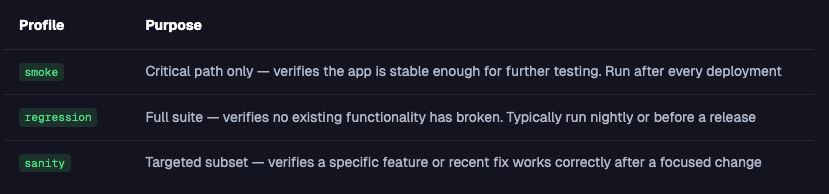
The active profile is passed as a build argument — no test code changes required.
Cross-Platform Testing: One Test, Two Platforms
One of the biggest advantages of a well-designed POM is the ability to run the same test on both Android and iOS without any code changes. This is achieved through platform-specific locator annotations in a single shared page object class — one locator for Android, one for iOS. At runtime, Appium resolves the correct locator based on the active platform. The test itself never changes.
Parallel Test Execution
Running tests sequentially on a single device is a bottleneck at scale. 500 tests that take 8 hours one after another can run in under an hour across a device farm. A robust framework is designed for parallelism from the start.
Parallel execution means:
- Multiple tests run simultaneously on different devices or emulators
- Execution time scales with device count, not test count
✅ What to get right from day one:
- Driver sessions are thread-local — never share an Appium driver between tests
- Tests are fully independent — no reliance on execution order or shared state
- Test data is generated or isolated per test — no two tests share the same account or dataset
⚠️ Parallel tests that share a driver session or test data will produce race conditions — tests will interfere with each other and generate inconsistent results. Design for isolation from the start. Adding parallelism to a framework that wasn't built for it isn't a quick fix — it's a rewrite. And until it's done, your CI pipeline keeps producing results you can't trust.
Device Farm Integration
Running tests locally on a few emulators is fine for development, but it's not enough to validate your app. Real users run your app on different manufacturers, OS versions, and screen sizes — and those differences surface bugs that emulators will never catch. A device farm gives you remote access to real physical devices at scale.
Popular options include:
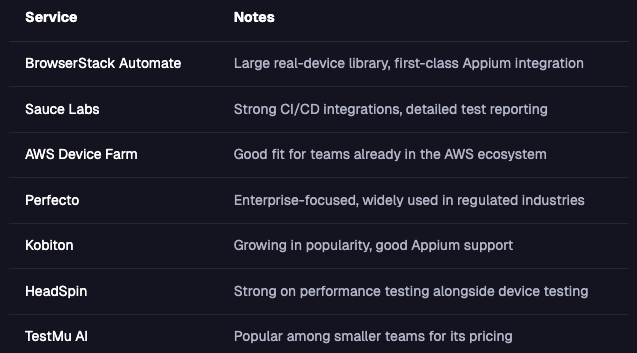
Your framework should be able to target any farm with a configuration change only — not a code change.
Cucumber / BDD Integration
In most test suites, the only people who can read the tests are the people who wrote them. Behavior-Driven Development (BDD) with Cucumber changes that — test scenarios are written in plain language using Gherkin syntax, so anyone on the team can read, review, and validate them.
Feature: User Login

  Scenario: Login with valid credentials
    Given the user is on the login screen
    When they enter valid email and password
    Then they should be taken to the home screen
Each Gherkin step maps to a method in your step definitions, which calls your page objects.
✅ Benefits:
- A product owner, business analyst, or developer can read a scenario and confirm it matches expected behavior — without opening a single line of code
- Scenarios serve as living documentation — when behavior changes, the test changes with it
- Writing scenarios first forces a shared conversation about expected behavior before any code is written
⚠️ Trade-off: BDD adds overhead — Gherkin files and step definitions require ongoing maintenance. The benefits are greatest when stakeholders actively review scenarios, but the structure and readability gains are valuable even in purely technical teams.
Accessibility Testing
Mobile accessibility testing verifies that your app is usable by people with disabilities — including those who rely on screen readers like TalkBack (Android) or VoiceOver (iOS).
Accessibility doesn't require a separate effort — a framework built on accessibility identifiers validates accessibility as a natural side effect of running tests.
At the framework level, this means:
- Using
content-desc(Android) andaccessibilityIdentifier(iOS) as locators — a test suite built on accessibility identifiers inherently validates accessibility as a side effect of running tests - Asserting that interactive elements have descriptive labels, so screen readers can identify them correctly
- Running dedicated accessibility audits as part of your CI pipeline — not just as a manual afterthought
💡 When developers add propercontentDescriptionandaccessibilityIdentifiervalues for testability, they simultaneously improve accessibility for real users. Testability and accessibility reinforce each other.
Visual Testing
Functional tests verify that your app behaves correctly. Visual tests verify that it looks correct.
Visual testing captures screenshots of your UI and compares them against approved baselines — flagging unexpected regressions like shifted layouts, wrong colors, or missing elements. Several tools integrate directly with Appium to add this as a layer on top of your existing framework.
A robust framework integrates visual assertions as an optional layer on top of your existing functional tests — not as a replacement for them.
Device Fragmentation
Device fragmentation is one of the defining challenges of mobile test automation. Unlike web testing, mobile means:
- Hundreds of Android manufacturers with custom UI layers (Samsung One UI, Xiaomi MIUI, etc.)
- Multiple OS versions in active use simultaneously
- Different screen sizes, densities, and aspect ratios
- iOS device families (iPhone, iPad, iPhone SE)
A robust framework is designed from the start to handle this variation — through configuration-driven device targeting, adaptive execution strategies, and manufacturer-aware handling.
⚠️ Don't try to test every device. Prioritize based on your actual user distribution. Your analytics data should drive your device matrix, not gut feeling.
Multi-Language Testing
If your app supports multiple languages, your framework should be able to run the same tests in any supported locale — without changing test code.
This means:
- Externalizing all text-based assertions— never hardcode
Loginin a test when the app can also displayConnexion - Loading expected strings from locale-specific resource files
- Configuring device locale as part of your device profile
💡 Localization testing often uncovers layout bugs that only appear in languages with longer strings. Testing in French, for example, will stress-test your UI in ways English never will.
AI Integration: Future-Proofing Your Framework
AI is actively reshaping test automation — and the frameworks being built today should be designed with AI integration in mind.
Self-Healing Selectors
Locators break when the UI changes. Self-healing test tools use AI to automatically find the correct element even when its selector has changed — using visual position, surrounding context, or element attributes. Several tools offer this as a layer on top of your existing Appium framework.
💡 Self-healing works best when your locators are centralized in page objects. When a selector changes, a self-healing tool only needs to update one location — not dozens of copies scattered across test files.
⚠️ Self-healing comes with a real risk: if a UI change was a regression — not an intentional update — a self-healing tool will fix the locator and pass the test, masking the underlying problem. Healed locators should always be reviewed and updated properly, never silently accepted as permanent fixes.
AI-Generated Tests
Emerging tools can generate test scenarios from app interactions — by recording user flows, analyzing screen content, or converting natural language descriptions into test code. The goal is to reduce the manual effort needed to build initial test coverage.
This won't replace thoughtful test design. AI-generated tests tend to cover the happy path well but miss edge cases, error conditions, and the nuanced scenarios that experienced testers know to look for. Think of it as a starting point, not a finished test suite.
⚠️ AI tooling in test automation is evolving quickly. Design your framework to accommodate these features — through clean interfaces and modular architecture — rather than hardcoding specific AI dependencies into the core. What works today may look very different in a year.
Putting It All Together
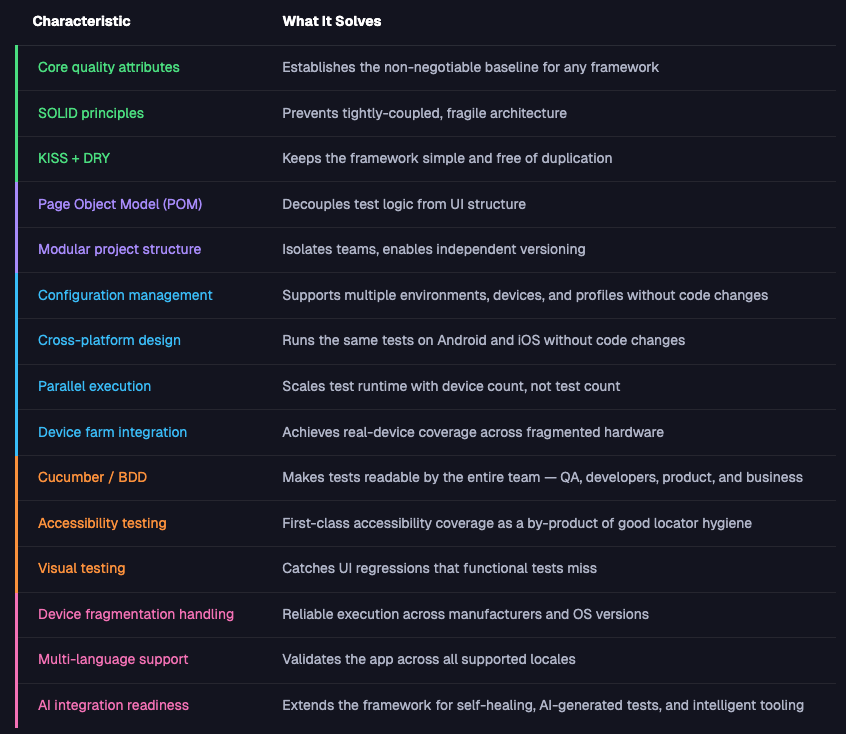
Here's a summary of every characteristic and the problem it solves:
What's Coming Up?
You now have the full blueprint. Every characteristic, every principle, every pattern — you know what a robust framework looks like and why each piece matters. What comes next is where it gets real.
The next articles in this series take each of these characteristics and turn them into working code — starting with the foundation: how to structure your project with Maven multi-module, set up your driver, and wire together your first page objects.
From there, the series builds layer by layer: BDD integration, cross-platform testing, configuration management, parallel execution, device farm integration, and beyond.
Every article builds on the one before it. By the end of the series, you won't just understand what a robust mobile test automation framework looks like — you'll have built one.


Discussion